Headless Browser Runtimes for Autonomous Agents
Agents need real browsers to navigate JavaScript-heavy sites and handle stateful interactions.
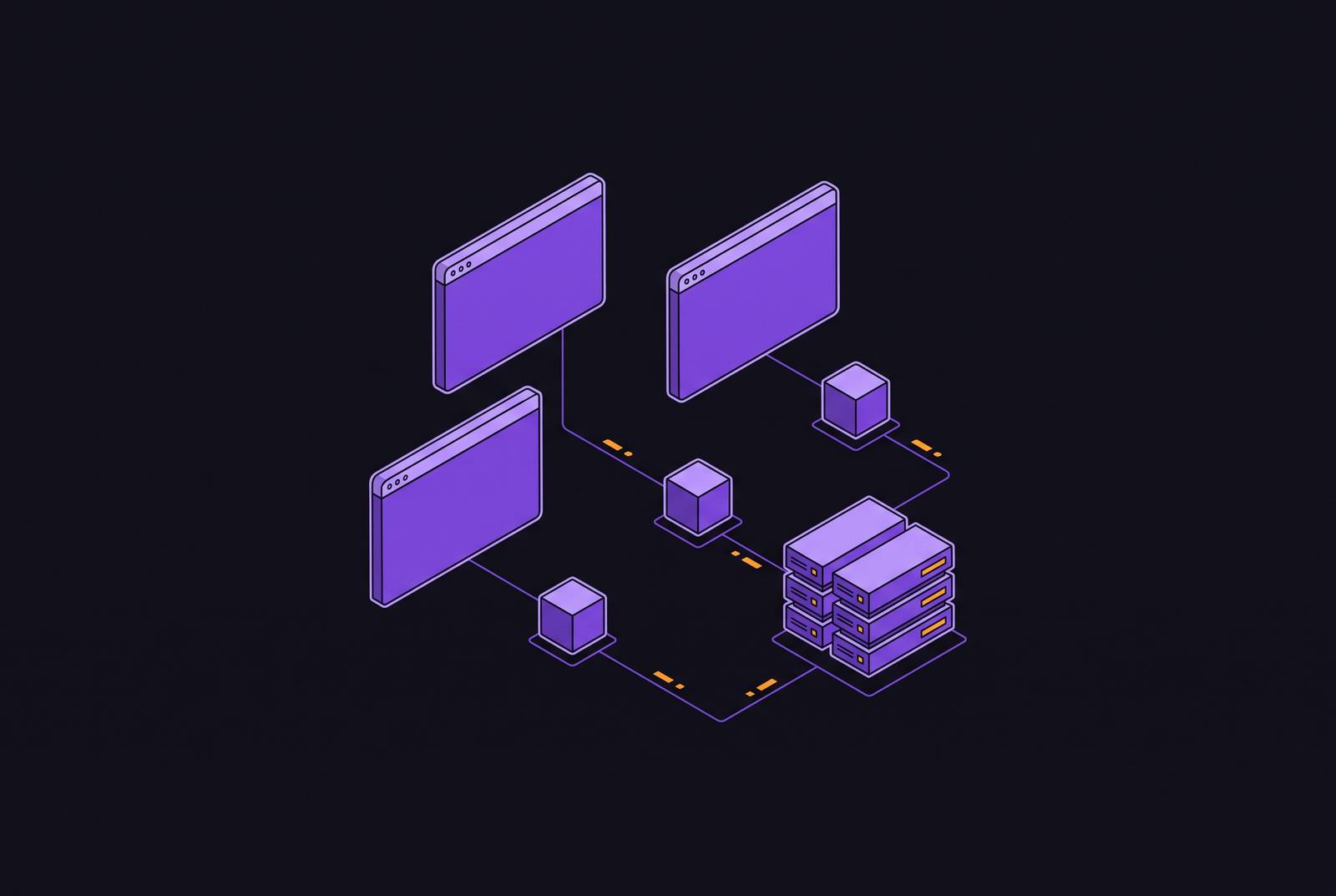
Most of the web that an agent needs to touch is built on JavaScript rendering, session-gated access, or pages that get assembled on the fly, so a raw HTTP request can only pull back the simplest kind of data. A GET request that returns a document is not the same as a browser that has logged in, is holding onto cookies, and can tell whether a multi-step checkout or form submission actually worked. That gap between fetching a page and acting on it is where static scraping runs out of road.
The shift toward LLM-driven agents makes this worse for anyone still leaning on raw HTTP. An agent built on a language model isn't replaying a fixed script of pre-recorded steps; it's deciding what to do at each turn, based on what the page in front of it actually shows. That requires a live, interactive surface the agent can read, act on, and check against, not a static snapshot of markup. Nothing short of a real browser, running the real page, gives an agent that.
Headless browser runtime vs. automation library vs. language model
A headless browser runtime is the managed environment that hosts and runs the browser process itself. It sits apart from the automation library, such as Playwright or Puppeteer, that sends it commands, and apart from the language model deciding what those commands should be. Conflating these three layers is common, and it leads teams to underbuild the one layer that carries the most operational weight.
| Layer | What it does | Examples | |---|---|---| | Automation framework | A library that drives a browser process through commands | Playwright, Puppeteer, Selenium | | Managed browser runtime | The infrastructure that hosts, isolates, and scales the browser processes themselves | Cloud browser infrastructure platforms | | LLM / agent logic | Decides what actions to take, step by step | The model driving the loop |
Automation frameworks are drivers that send commands to a browser process. They tell a browser where to click and what to type, but they have no opinion about where that browser process lives, whether its session survives a restart, or whether it's isolated from other sessions running alongside it. Session persistence, process isolation, anti-bot handling, and observability all live at the runtime layer, and no automation library, however well built, can solve them on its own.
The five architectural problems that separate capable runtimes from naive ones
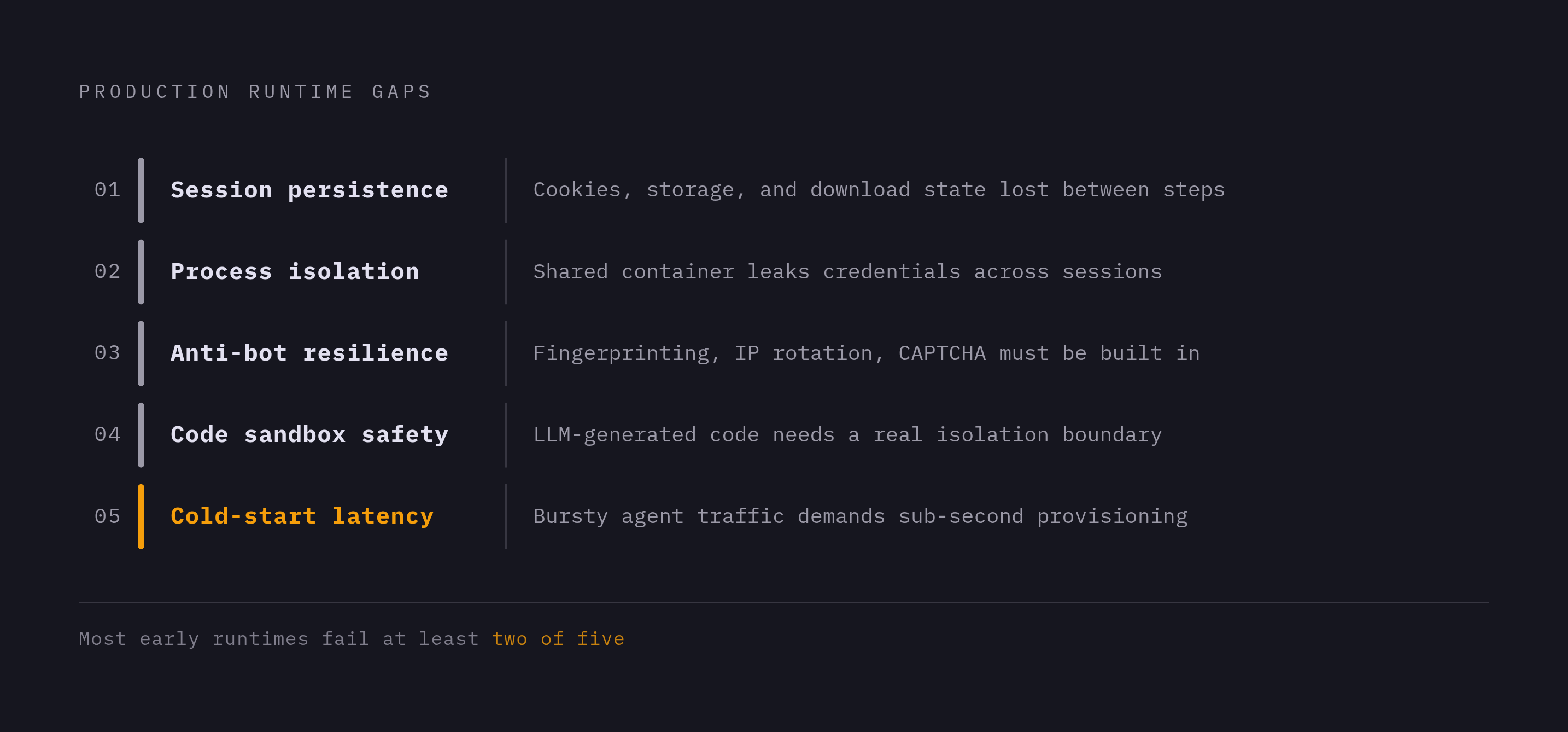
Spinning up a single browser instance is the easy part; nearly any stack can do that. What separates a runtime that holds up in production from one that falls apart under real agent traffic comes down to five specific design problems, and most early approaches fail at least two of them. The first is session persistence: cookies, local storage, and download state have to survive across an agent's steps and across separate sessions, or the agent ends up re-authenticating on every task it runs. The second is process isolation: when sessions share a container, one user's credentials and page data can leak into another's, and keeping sessions apart is a matter of trust, not a nice-to-have optimization. The third is anti-bot resilience, since modern sites actively work to detect and block automated traffic, and a runtime that ignores fingerprinting, IP rotation, and CAPTCHA handling pushes that entire burden onto every team that builds on it. The fourth is the safety of running code a language model wrote, because that code is untrusted and probabilistic by nature, and the runtime needs a real sandbox boundary so a bad generation can't touch the host machine or any other session. The fifth is cold-start and wake latency: agent traffic tends to arrive in bursts, and a runtime that takes several seconds to provision a browser introduces delay that users of agent products will feel directly. Each of the next five sections takes one of these problems in turn.
Chromium's memory profile as a poor baseline for agent workloads
Chromium was built for a person opening a handful of tabs, not for a host running hundreds of concurrent automated sessions at once, and its memory footprint still reflects that original design. A single Chromium instance uses far more RAM than lightweight alternatives built for automation, and when an agent spins up several browser sessions in parallel (which multi-step and multi-user agents do constantly) the combined load can push a standard container past its limits. This isn't a case of Chromium being poorly built; it's a case of a browser designed for human compatibility being asked to do a job it was never sized for.
That mismatch has pushed a wave of purpose-built engines meant for machine use. Lightpanda 1.0 bills itself as "the first browser for machines, not humans," a fast, lightweight engine aimed at automation, crawling, and AI agents, with real JavaScript execution behind it, built on thousands of commits and a wide set of passing subtests from a standard web-platform compatibility test suite as of its 1.0 release. Research into an engine called Obscura, written in Rust and running JavaScript through V8, shows that a browser can support the Chrome DevTools Protocol and act as a drop-in replacement for headless Chrome under Playwright or Puppeteer while it uses a fraction of Chromium's memory.
None of this comes free. A lightweight engine has to pass enough of the web platform test suite to actually handle the sites agents are sent to visit, and a partial implementation that chokes on common JavaScript patterns is a liability dressed up as an optimization. For workloads where full Chromium compatibility genuinely can't be given up, the fix is scheduling Chromium instances more efficiently, which points straight at the snapshot-restore approach covered further down.
Session state and persistence as a first-class runtime concern
When a browser session loses its authenticated state between one agent step and the next, the agent itself stops functioning, because every downstream task it was given assumes the session is still live and still logged in. Several things need to survive across steps and across sessions for an agent to keep working: authentication cookies and session tokens, local storage and IndexedDB state, any files or screenshots the agent has pulled down and still references, and full browser profiles that preserve a consistent fingerprint for anti-bot purposes. Dropping any one of these leaves the agent effectively starting over on a task it thought it had already made progress on.
Production systems keep an agent's authenticated state intact across restarts by maintaining persistent, per-agent browser profiles and writing cookies back after every session closes. One concrete pattern along these lines is a tool that saves and loads authentication state, cookies and storage, between separate runs, so a session picks up exactly where the last one left off. Cloudflare's browser automation product, renamed from Browser Rendering to Browser Run on April 15, 2026, takes a related approach to session continuity through Session Recordings, capturing every DOM change, mouse and keyboard event, and page navigation so a team can replay a session and see exactly where agent state diverged from what was expected.
The per-user agent pattern raises the stakes further. Each user's agent needs its own browser profile and its own credential store, kept apart from every other user's, which turns persistence from a single-session bookkeeping problem into a multi-tenant one that has to hold up across an entire fleet of agents running at once.
Anti-bot resilience: the layer most runtimes treat as optional
An individual agent developer should not have to write anti-bot evasion from scratch. It belongs in the runtime layer, because doing it properly means running IP rotation at real scale, managing device and browser fingerprints, and solving CAPTCHAs as part of the normal session lifecycle, none of which any single application team is well positioned to rebuild on its own.
Runtimes that handle this well share a few traits. They maintain residential IP pools with a sticky identity assigned per agent, so a given agent presents the same consistent, human-looking network fingerprint across repeated sessions rather than a new, suspicious one each time. They solve CAPTCHAs automatically as a built-in part of the session lifecycle, not as a separate service bolted on afterward. And they apply stealth behavior at every point in a session where detection risk is present, including when the session first opens, during re-authentication, redirect handling, and form submission.
A runtime that leaves this work to the developer creates a false economy. The developer pays less for the runtime itself but absorbs the full engineering cost of rebuilding anti-bot defenses, and that cost doesn't go away after the first build: it recurs every time a target site updates its detection methods, which happens continually across the sites agents are sent to operate on.
Running LLM-generated browser code safely requires a real isolation boundary
Code written by a language model is untrusted by definition. The model is a probabilistic generator of text, not an authority on what's safe to execute, and a generation that misbehaves must be stopped before it can touch the host machine, the network, or any other session running alongside it.
Standard container isolation, the kind Docker provides out of the box, doesn't meet that bar, because containers on the same host share a single kernel. A kernel exploit, or even just a runaway process, inside one container can reach the host underneath it. Micro-VM isolation, the approach taken by Firecracker and similar tools, gives each session its own kernel running on real hardware virtualization, so a kernel exploit inside one session has no path to the host or to any session next to it. That's become the standard architecture for workloads built on untrusted, agent-generated code.
What this produces is one microVM per browser session, so each agent session runs in full isolation from every other. Firecracker's own specification states that it takes no more than 125 milliseconds to go from the API call that starts an instance to the Linux guest's init process starting up, and Firecracker's public materials advertise the same under-125ms boot time, which is what makes booting a fresh microVM for every single session operationally realistic. A host running at high density can boot a large number of these microVMs per second, which matches the bursty, unpredictable way agent traffic actually arrives. Amazon's Bedrock AgentCore Runtime runs on exactly this one-session-one-microVM model in production. Cloudflare's Browser Run, renamed from Browser Rendering on April 15, 2026, runs sessions across Cloudflare's global network, scaling capacity up and down on demand and opening sessions near the user for lower latency, which amounts to an infrastructure-managed version of the same per-session provisioning idea.
A microVM boundary matters, but it isn't the whole story on its own. Network policy, how much of the filesystem a session can see, how secrets get handled, and how cleanly a session's resources get torn down afterward all shape the actual risk surface that remains. Isolation stops a compromised session from escalating its own privileges, but if a session is poorly scoped, it can still leak data out through network paths that were never locked down to begin with. For any agent product where a user's browser session is carrying their real credentials and private data, this isolation argument is also a question of whether users and regulators can trust the system.
Snapshot-restore scheduling and the economics of browser sessions at scale
The cost structure here is a genuine engineering problem, not an incidental one. Agentic browser sessions spend much of their time simply waiting, for an LLM to return a response, for a page to finish loading, for some external API call to come back, and pricing models built around pre-allocated compute keep charging for that idle time regardless of whether anything is actually happening.
Snapshot-restore is the mechanism that fixes this. It pauses a browser session's full state into a snapshot once it goes idle, drops compute charges to zero while it sits in standby, and restores that exact snapshot the moment the next request comes in, so the session looks continuous to the agent even though real compute is only being paid for while it's active. For this to actually work, a snapshot has to capture more than just whatever's written to disk. It needs the filesystem state, the in-memory process context the browser was running in, and the active browser profile, cookies and local storage included, or the session that comes back isn't really the one that went to sleep.
Resume speed is what makes or breaks the whole approach. A snapshot-restore cycle that takes several seconds just reintroduces the same latency problem it was supposed to solve, so sub-second, or at worst low-hundred-millisecond, resume time is the actual bar for any agent product where a user is sitting there waiting on a response.
Amazon's AgentCore Runtime V2, which reached general availability on September 18, 2026, is a working example of snapshot-restore applied at scale: it prepares an agent's environment once, snapshots it, and restores that same snapshot for every new instance that spins up afterward, producing cold starts that are dramatically faster than the seconds-long waits typical of the earlier V1 design, and holding that speed consistently across a wide range of image sizes. The trade-off is that list rates for CPU and memory went up substantially under V2, so short-lived chat agents that never hold idle state long enough to benefit from snapshot reclaim face a straightforward rate increase. The per-user agent model sharpens this trade-off further: peak-to-average memory ratios in agent workloads can run dramatically higher than baseline, which turns standby pausing from a cost-saving feature into something closer to a financial necessity for any platform trying to run a large fleet of per-user agents without its compute bill spiraling.
How agents talk to browsers through CDP and MCP
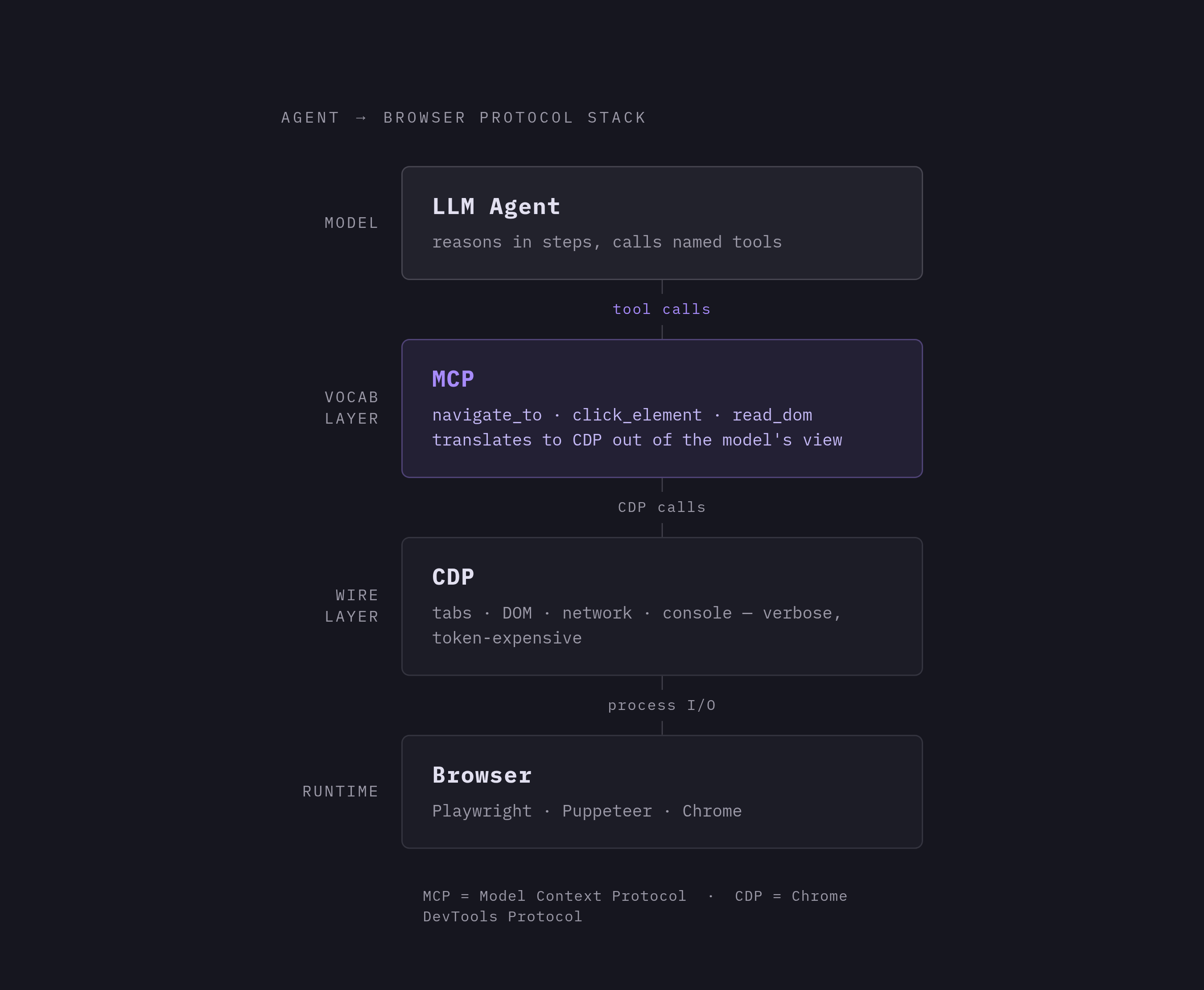
None of this infrastructure matters to an agent unless there's a protocol connecting it to one. Agents issue commands through a defined protocol to control a browser, and which protocol is in use shapes how much control the agent has over the browser, how many tokens the interaction burns through, and which runtimes the agent is able to target.
The Chrome DevTools Protocol, CDP, is the low-level layer that most of this stack runs on top of. It's the low-level interface that lets an external process open tabs, navigate pages, inspect the DOM, and read back console and network activity, and it's what tools like Playwright and Puppeteer are built on top of. CDP gives an agent fine-grained, direct control over a browser process, but that control comes at the cost of verbosity: raw CDP messages are detailed enough that routing an LLM's decisions straight through them tends to burn tokens fast and adds complexity that most agent loops don't need to carry directly.
The Model Context Protocol, MCP, sits above CDP and gives language models a cleaner, more structured way to reach a browser's capabilities, so they don't have to reason about CDP's full surface directly. An MCP server exposes a defined set of tools, things like "navigate to a URL" or "click an element," that an agent calls by name, while an MCP layer translates those calls into the underlying CDP calls, out of the model's view. That division of labor is becoming the standard shape of the agent-to-runtime relationship: CDP handles the low-level mechanics of actually driving the browser, and MCP gives the model a vocabulary suited to how it reasons, step by step, about what to do next. Which protocol a runtime exposes, and how well it supports this layered approach, is increasingly the deciding factor in which runtimes agent builders choose to build on.